Overview
This document explains how to add a warning comment to a client's record. The warning is displayed when the client is searched for and selected during a future reservation, allowing operators to identify clients who should not be accepted or to see other important operational reminders.
Prerequisites
- Access to the RezExpert Availability Grid.
- Permission to search for and edit client records.
- An existing client record.
- The warning message or operational reminder that must be recorded.
Steps
- From the Availability Grid, scroll down and expand the Client Editor panel.
- Click Search and locate the client.
- Select the client from the search results.
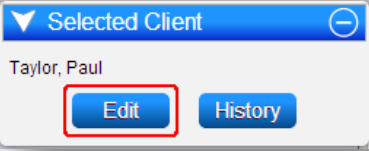
- In the Selected Client panel, click Edit.
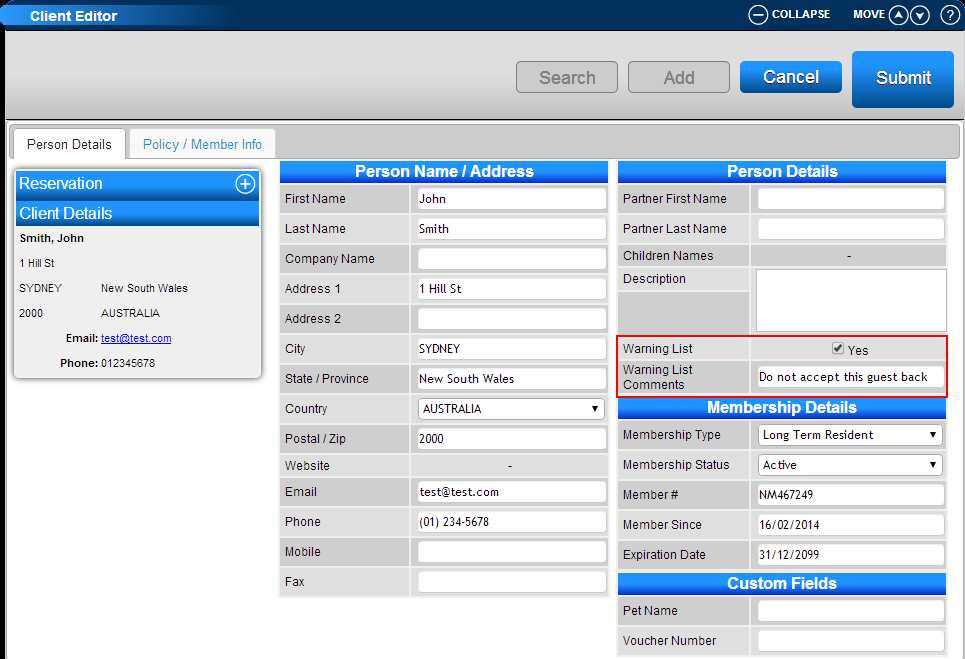
- In the Client Editor, open the Person Details section.
- Enable the Warning List flag.
- Enter the warning message in the Warning List Comments field.
- Click Submit to save the changes to the client record.
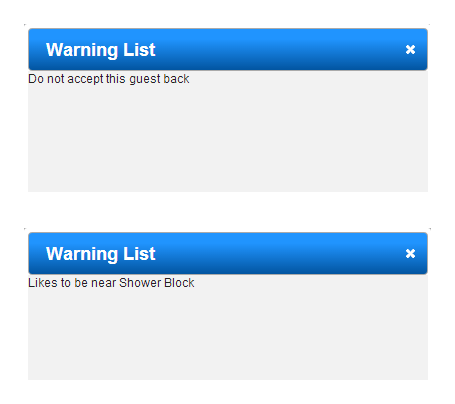
- The next time the client is searched for and selected, the saved comment appears in a Warning List alert.
- Warning comments can also be used for relevant operational reminders, such as an item left behind during a previous stay or a special requirement.
Troubleshooting
- If the client does not appear in the search results, verify the spelling and search using another known client detail.
- If the Warning List option is not visible, confirm that the Person Details section is open.
- If the alert does not appear later, reopen the client record and confirm that the Warning List flag is enabled, the comment is present, and the record was submitted successfully.
- If the client cannot be edited, confirm that your account has permission to modify client records.
Video